Practice converting between binary, decimal, and hexadecimal, and explain how computers represent different kinds of data using bits.
Read each problem carefully. Show your work when doing conversions or calculations.
Representing numbers, text, images, and sound with bits
CS - Grade 9-12
- 1
Convert the binary number 101101 to decimal. Show the place values you used.
- 2
Convert the decimal number 58 to binary.
- 3
Convert the binary number 11001010 to hexadecimal.
- 4
Convert the hexadecimal number 3F to decimal.
- 5
An unsigned 8-bit integer can store values from 0 to 255. Explain why 255 is the largest value.
- 6
Write the decimal value represented by the 8-bit binary pattern 11111111 if it is treated as an unsigned integer.
- 7
Using 8-bit two's complement, what decimal number is represented by 11111110?
- 8
Using 8-bit two's complement, write the binary representation of -13.
- 9
ASCII uses 7 bits per character, while extended ASCII often uses 8 bits per character. How many more different symbols can be represented with 8 bits than with 7 bits?
- 10
The ASCII code for uppercase A is decimal 65. Convert 65 to 8-bit binary.
- 11
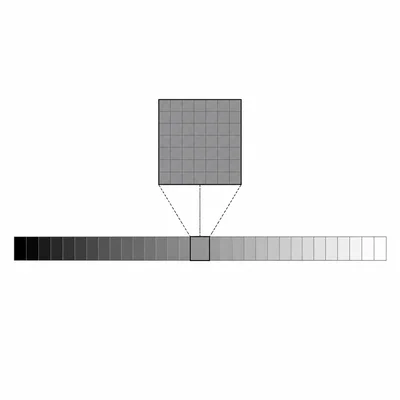
A grayscale image uses 8 bits per pixel. How many different gray levels can each pixel represent?
- 12
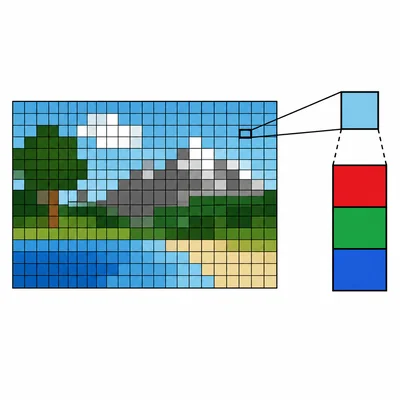
A small image is 100 pixels wide and 50 pixels tall. Each pixel uses 24 bits for color. How many bytes are needed to store the raw image data, not including metadata or compression?
- 13
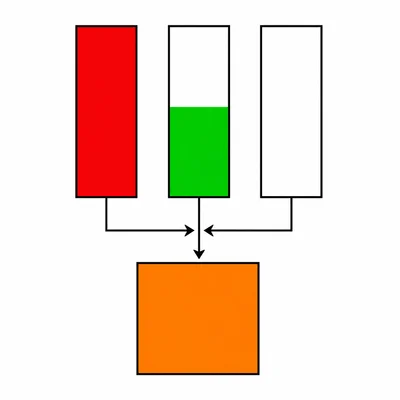
A color is represented in RGB as (255, 128, 0). Explain what each number means.
- 14
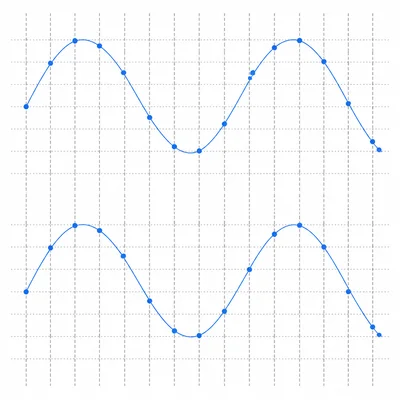
A sound file is recorded with a sample rate of 44,100 samples per second, 16 bits per sample, and 2 channels. How many bits are needed for 1 second of uncompressed audio?
- 15
Explain one advantage and one disadvantage of using compression when storing data.