Sign in to save

Bookmark this page so you can find it later.

Sign in to save

Bookmark this page so you can find it later.

Computer Science high-school May 24, 2026

How Do Video Games Render a 3D World?

From math to pixels on a screen

A computer game scene broken into a 3D model, camera view, pixel grid, and final image to show the rendering process.

A video game builds a world from many simple shapes, then decides what the player’s camera can see. The computer turns those shapes into colored dots on the screen many times each second. Special chips do this work very fast because they can handle thousands of small drawing tasks at once.

Big Idea. Common Core HSG-MG.A.1 connects 3D rendering to using geometry to model real objects and solve design problems.

A 3D game feels like a place you can move through, but the screen is flat. The trick is a fast chain of math and image making. The game stores objects as points, edges, and flat faces. It adds images called textures to make those faces look like brick, skin, grass, or metal. A virtual camera marks the player’s view. Then the computer figures out which parts of the world land on each screen pixel. This happens again and again as the player moves. A smooth game may draw 60 or more new images every second. The core idea is not magic. It is geometry, light, memory, and speed working together. Students can connect this to coordinate geometry, functions, and rates. For a related math idea, explore the graphing calculator and notice how changing coordinates changes a picture.

A world made of triangles
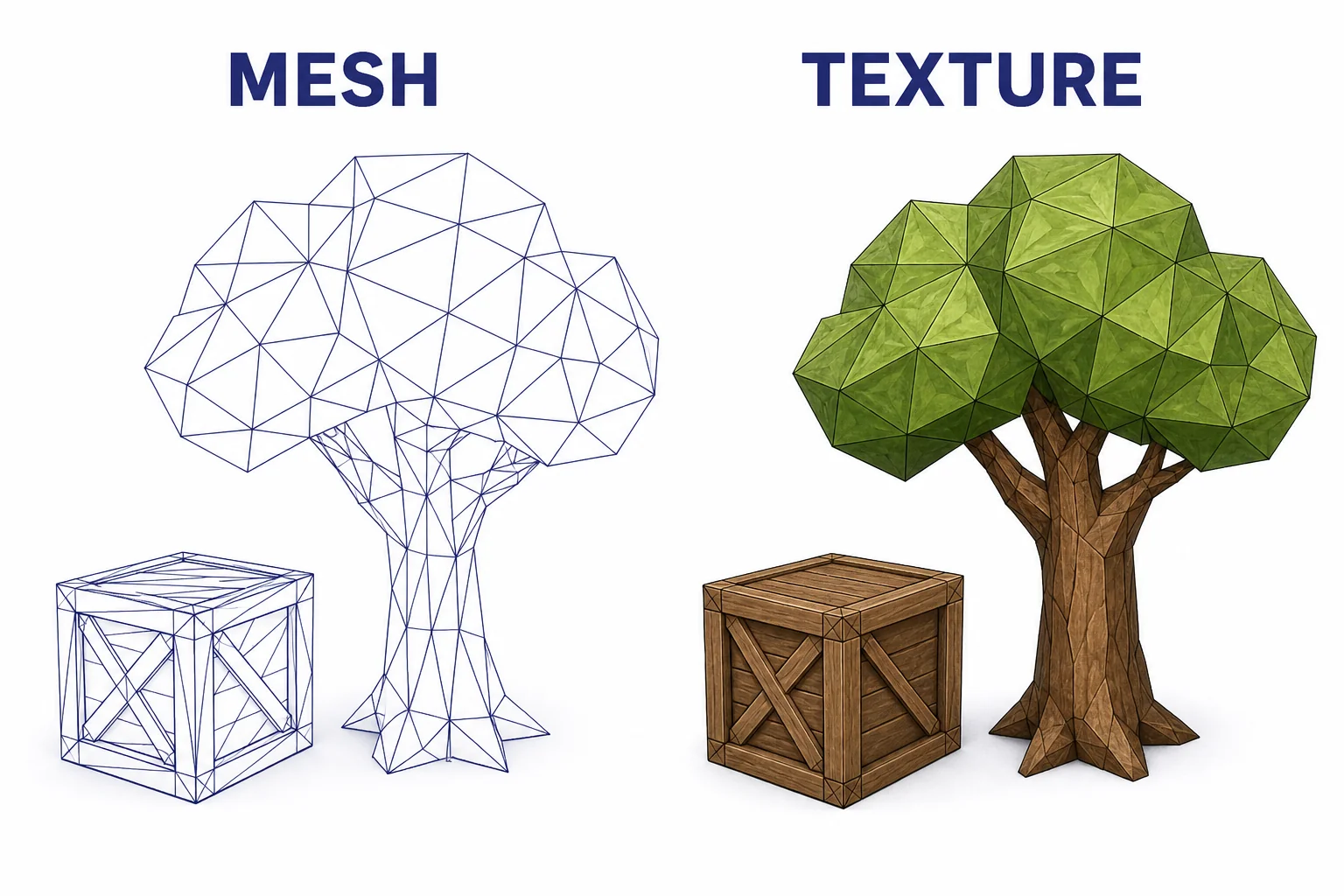
A simple 3D tree and crate shown as triangle meshes beside the same objects with textures applied.
Meshes give objects shape. Textures add detail.
Most 3D game objects begin as meshes. A mesh is a set of points connected into small flat faces. Triangles are common because three points always make one flat plane. A character, tree, car, or building may contain thousands of triangles. Each point has coordinates such as $\(x\)$, $\(y\)$, and $\(z\)$. The game engine moves those points when a door opens, a wheel turns, or a character runs. Textures add surface detail without building every tiny bump as geometry. A flat wall can look like brick because an image is wrapped onto it. Extra maps can store clues about roughness, shininess, or small surface dents. This saves time. The computer can draw a detailed-looking scene without modeling every grain of sand. The art is visual, but the structure is numerical.

A game world is mostly coordinates, triangles, and images.

The camera turns 3D into 2D
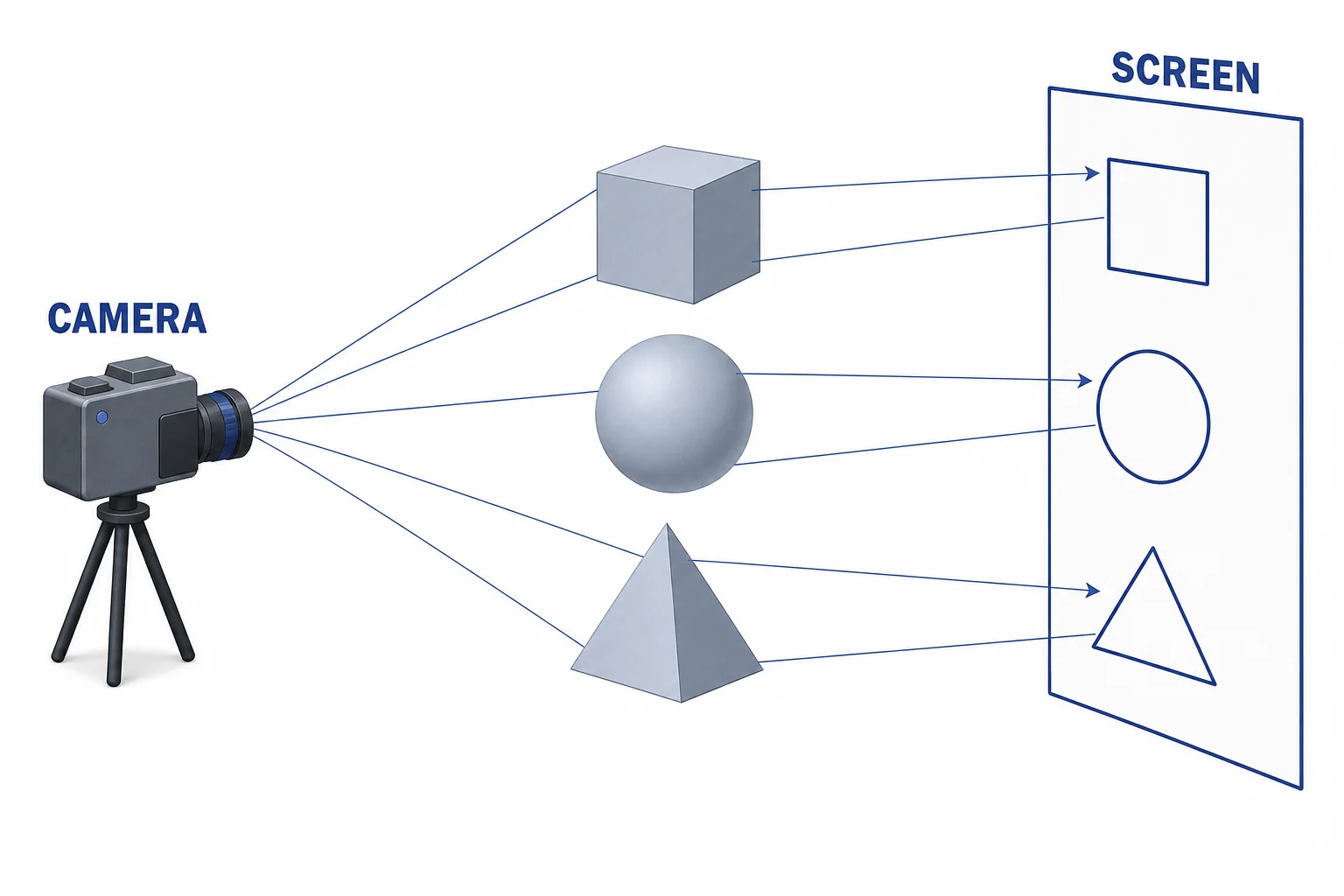
A virtual camera looking at 3D objects, with projection lines landing on a flat screen plane.
Projection maps 3D positions onto a flat screen.
The player does not see the whole game world at once. The game uses a virtual camera. This camera has a position, a direction, and a field of view. First, the engine places every object in the world. Then it compares those objects to the camera. Points in front of the camera can be drawn. Points behind it are ignored. The 3D coordinates are projected onto a flat image plane, much like shadows land on a wall. Farther objects appear smaller because the projection changes their screen positions. This step uses matrix math, which is a compact way to move, rotate, and scale many points. The final result is a list of shapes that have 2D screen locations. The world is still stored in 3D, but the display needs a flat image.

Rendering starts by asking what the camera can see.

Rasterization fills the pixels
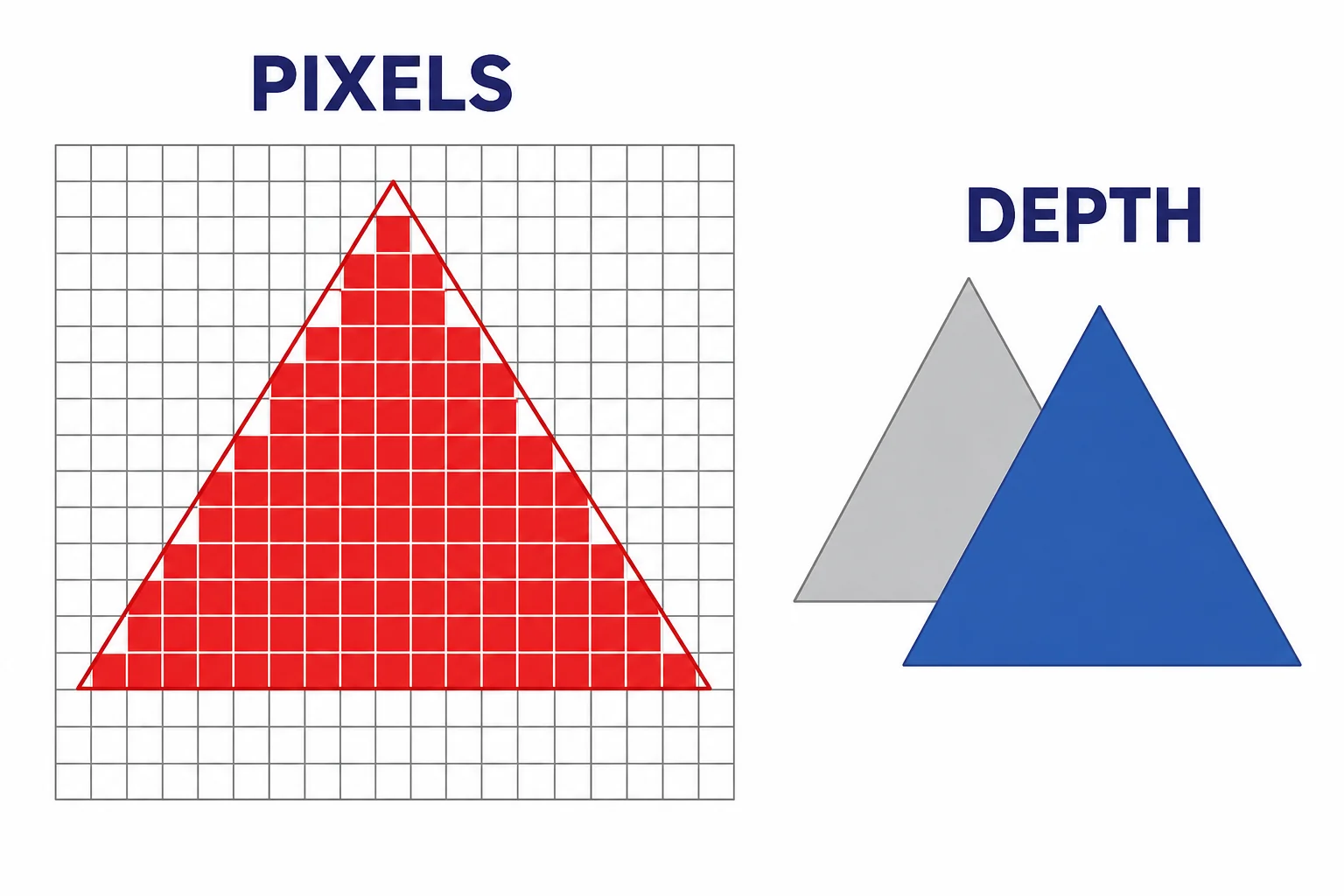
A projected triangle over a pixel grid, with covered pixels filled and a depth test comparing front and back triangles.
Rasterization decides which pixels a triangle covers.
Rasterization is the main drawing method used in many real-time games. After projection, each triangle has a shape on the screen. The rasterizer finds which pixels are inside that triangle. Then a small program called a shader chooses a color for those pixels. The color can come from a texture, a light calculation, or both. The computer also tracks depth. If two triangles cover the same pixel, the nearer one should hide the farther one. This is why a wall blocks the view of a room behind it. Rasterization is fast because it turns each triangle into many independent pixel jobs. Those jobs can be split across the graphics chip. It is a practical match for games because the image must be updated quickly when the player moves, jumps, or turns.

Rasterization is fast because many pixel decisions can happen at the same time.

Ray tracing follows light paths
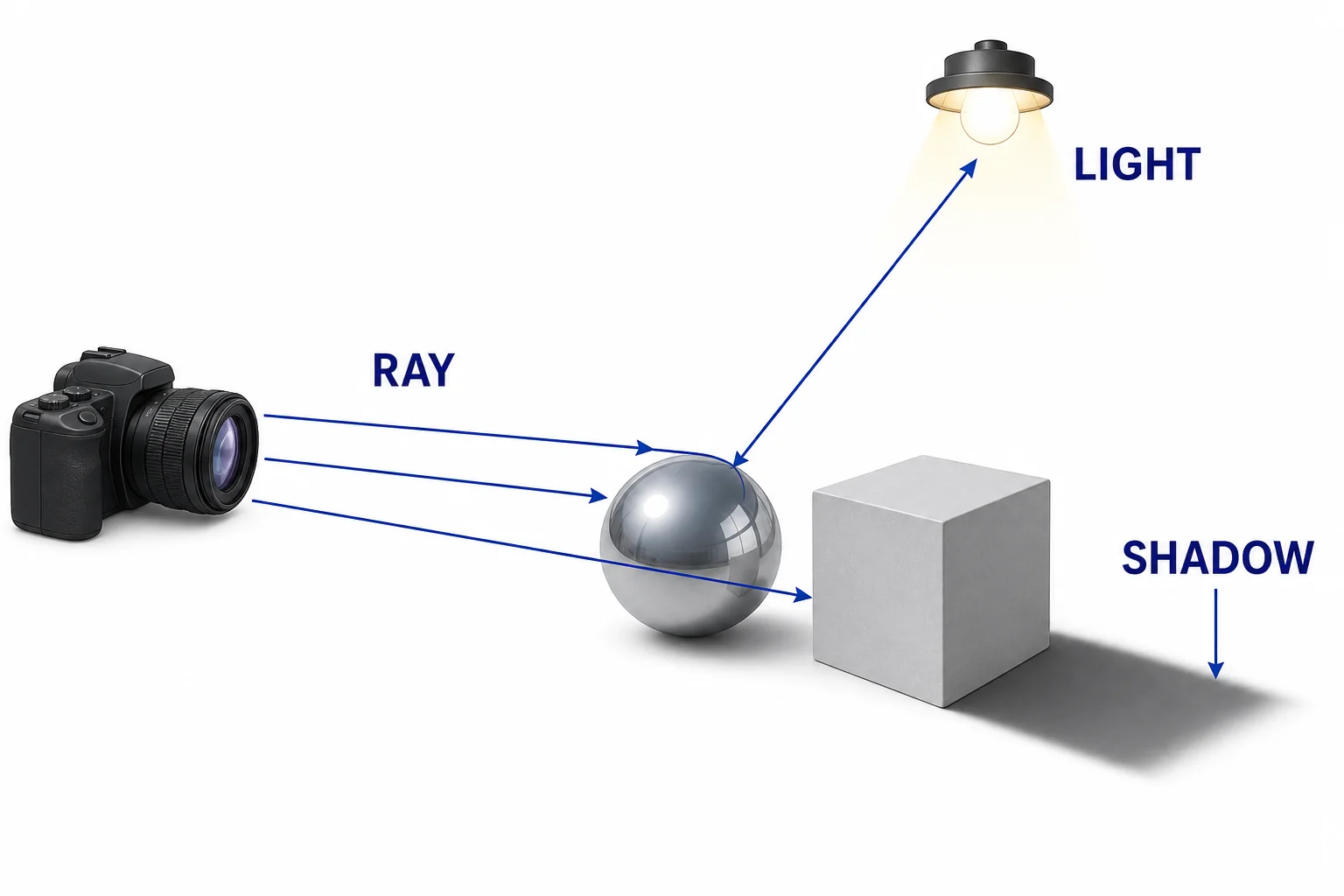
Camera rays hitting a shiny sphere, bouncing toward a light source, and creating a shadow behind another object.
Ray tracing tests paths that light could take.
Ray tracing works from a different idea. It sends imaginary rays from the camera into the scene. Each ray checks what object it hits first. Then the renderer can ask where light would come from, whether the surface reflects other objects, or whether a shadow blocks the light. This can make mirrors, glass, soft shadows, and global lighting look more natural. The cost is time. A single pixel may need many rays, and each ray may bounce. That is much more work than filling a triangle on a grid. Modern games often mix methods. Rasterization draws most of the scene. Ray tracing may add selected effects, such as reflections in water or shadows under a car. The best method depends on the target hardware and the desired frame rate.

Ray tracing can model reflections and shadows, but it takes more computation.

Why GPUs draw so fast
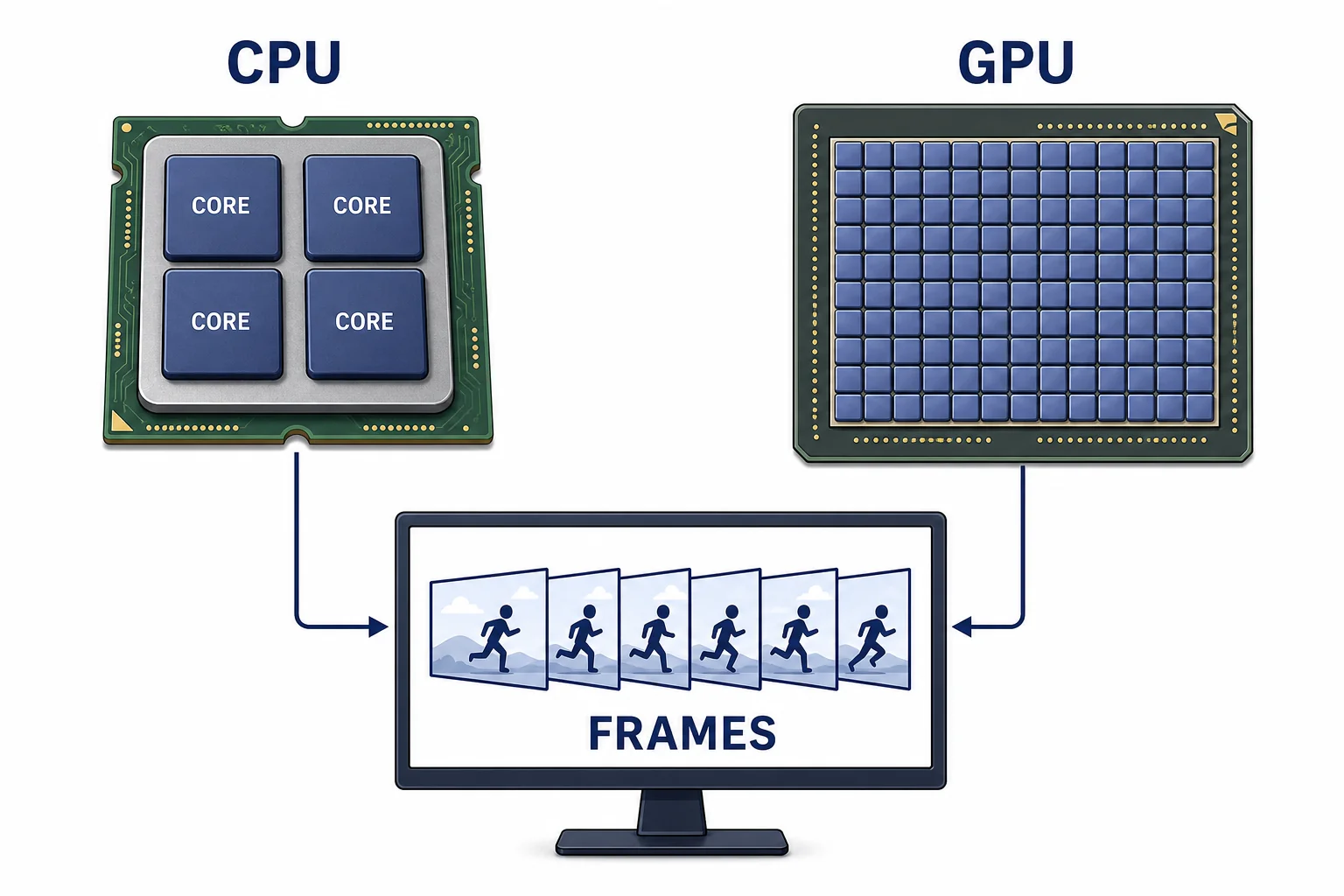
A CPU with a few large cores compared with a GPU with many small cores sending completed frames to a monitor.
GPUs are designed for many similar calculations at once.
A CPU is built for many kinds of tasks. It is good at making decisions, running the game rules, loading files, and handling input. A GPU is built for a different job. It has many smaller processing units that do similar math on many pieces of data at once. Rendering has exactly that pattern. One triangle can be transformed while another is shaded. One pixel can be colored while thousands of other pixels are colored too. This parallel work helps games keep up with frame rate goals. Frame rate is how many images the game produces each second. Refresh rate is how many times the display can show a new image each second. A 120 hertz monitor can refresh 120 times each second, but the game must still render frames fast enough to use that ability.

A GPU is fast at rendering because the work splits into many small, similar jobs.

Vocabulary

Mesh
A 3D object made from points, edges, and flat faces, often triangles.
Texture
An image wrapped onto a 3D surface to add color and detail.
Rasterization
A rendering method that finds which screen pixels are covered by projected shapes.
Ray tracing
A rendering method that follows imaginary rays through a scene to model light effects.
Frame rate
The number of complete images a game renders each second.
Refresh rate
The number of times a display can update its image each second.

In the Classroom

Build a paper mesh

25 minutes | Grades 9-12

Students make a cube or simple character from triangles drawn on graph paper. They label vertices with coordinates and explain how the same mesh could be moved or scaled.

Pixel coverage challenge

20 minutes | Grades 9-12

Students place a triangle over a printed pixel grid and decide which pixels should be filled. Then they compare answers and discuss why edge rules matter in a real renderer.

Frame rate and refresh rate demo

15 minutes | Grades 9-12

Students calculate frame time for 30, 60, and 120 frames per second. They compare those numbers with monitor refresh rates and explain why both the computer and the display affect smooth motion.

Key Takeaways

  • 3D game worlds are stored as geometry, textures, lights, cameras, and rules.
  • Projection turns 3D coordinates into 2D screen positions.
  • Rasterization quickly fills pixels covered by triangles.
  • Ray tracing follows light paths and can create realistic reflections and shadows.
  • GPUs render fast because they run many similar calculations in parallel.