Practice explaining how information moves on the internet using packets, addresses, routers, and common protocols.
Read each problem carefully. Write complete answers and show your reasoning when needed.
Understanding how data travels across networks
CS - Grade 6-8
- 1

A student sends a photo to a friend over the internet. Explain why the photo is split into packets instead of being sent as one giant file.
- 2

Each packet usually has a header and data. Describe what the header does and what the data part contains.
- 3
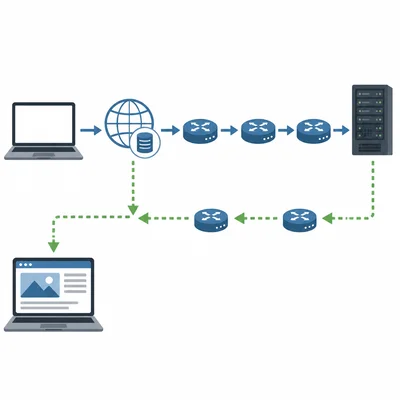
Put these steps in a reasonable order: A web page appears on your screen; DNS finds the IP address for the website name; your browser requests the web page; packets travel through routers; the server sends packets back.
- 4

What is an IP address, and why do devices on the internet need one?
- 5
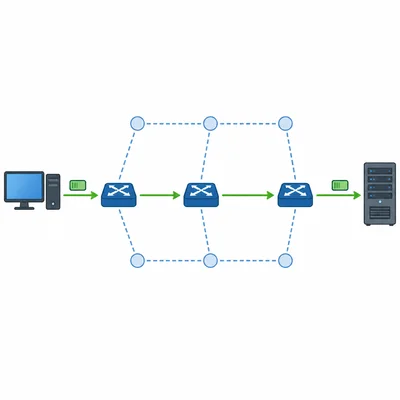
A packet is sent from Computer A to Server B. It passes through three routers. What is the job of each router?
- 6
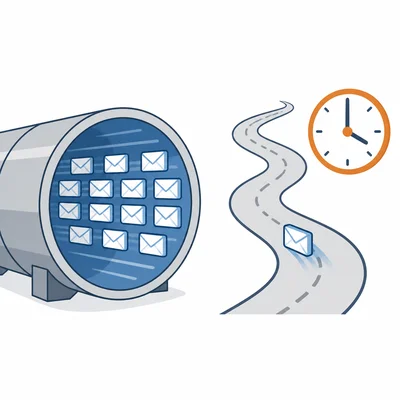
Explain the difference between bandwidth and latency using an example.
- 7
A video call freezes for a few seconds, then continues. Give two possible network reasons this might happen.
- 8
What is a protocol in computer networking? Give one example of an internet protocol.
- 9
TCP and UDP are two transport protocols. TCP checks that packets arrive and resends missing ones. UDP sends packets quickly but does not always check for every missing packet. Which protocol would be better for downloading a homework file, and why?
- 10
Which protocol would often be better for a live online game, TCP or UDP? Explain your choice.
- 11

A packet header says it is packet 4 of 10. Why is that number useful when the packets reach the destination?
- 12

DNS is sometimes described as the internet's phone book. Explain what DNS does.
- 13
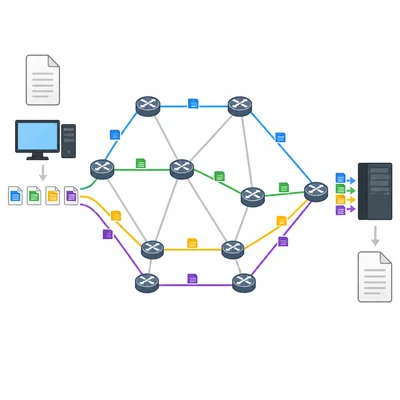
A classmate says, "If a packet takes a different route from the other packets, the message will not work." Explain why this statement is not always correct.
- 14

HTTPS is used by many websites. What does HTTPS add compared with regular HTTP, and why is it important?
- 15
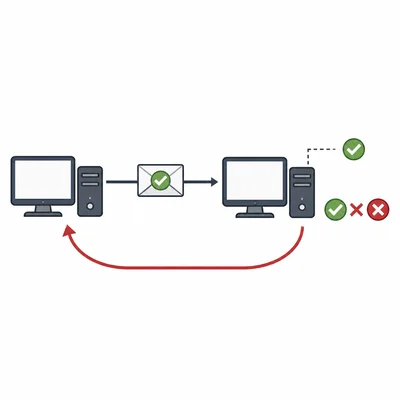
A packet includes a simple error check value. The receiver calculates the value again and it does not match. What should the receiver do, and why?