Practice the basics of CSS, including selectors, colors, fonts, the box model, and linking stylesheets to HTML pages.
Read each problem carefully. Write complete answers and show any CSS code needed.
Practice using selectors, properties, values, and basic page style rules
CS - Grade 6-8
- 1

In your own words, explain what CSS does for a webpage.
- 2
Look at this CSS rule: p { color: blue; } Identify the selector, the property, and the value.
- 3
Write a CSS rule that makes all h1 headings purple and centered.
- 4
A student wants every paragraph on a page to use the font Arial. Write the CSS rule they should use.
- 5
Explain the difference between a class selector and an ID selector in CSS.
- 6
An HTML paragraph is written as <p class="warning">Be careful!</p>. Write a CSS rule that makes this paragraph text red.
- 7
An HTML heading is written as <h1 id="main-title">My Website</h1>. Write a CSS rule that makes only this heading have a green background.
- 8
Name two different ways CSS can describe colors, and give one example of each.
- 9

Write a CSS rule that gives every image a solid black border that is 2 pixels wide.
- 10

The CSS box model includes content, padding, border, and margin. Explain what padding does.
- 11
Look at these two CSS rules: p { color: black; } p { color: orange; } If both rules apply to the same paragraph and nothing else changes, what color will the paragraph be, and why?
- 12
Find and correct the error in this CSS rule: h2 { font-size 24px; color: navy }
- 13
Write the HTML line that links an external CSS file named styles.css to a webpage.
- 14
Write a CSS comment that says Main page styles.
- 15
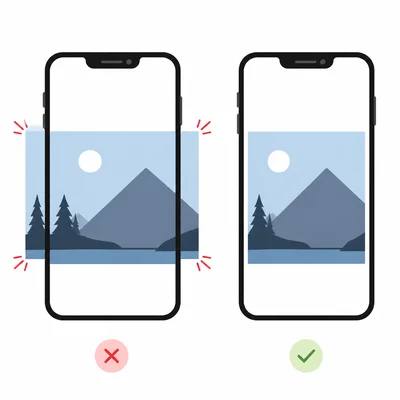
A student writes this CSS for images: img { width: 600px; } Explain one problem this could cause on a small phone screen and suggest a better rule.