SQL Query Playground
Practice reading and writing SQL without installing a database. Type a query, see the result table update live, and watch the logical query plan rebuild as you add a JOIN, a filter, a group, or a sort. This is a teaching subset that runs in plain JavaScript on three fixed sample tables, so it is great for learning the order of operations rather than replacing a real database engine.
This runs a teaching subset of SQL on the three small sample tables below, not a full database engine. Supported clauses are SELECT, FROM, JOIN, WHERE, GROUP BY, HAVING, ORDER BY and LIMIT, with the aggregates COUNT, SUM, AVG, MIN and MAX. Unsupported syntax returns a short error.
Results
12 rows| name | product | amount |
|---|---|---|
| Ava | Laptop | 1200 |
| Ava | Mouse | 25 |
| Ava | Monitor | 250 |
| Ben | Desk | 300 |
| Ben | Cable | 15 |
| Cara | Laptop | 1200 |
| Cara | Monitor | 250 |
| Cara | Mouse | 25 |
| Drew | Keyboard | 75 |
| Eve | Desk | 300 |
| Eve | Mouse | 25 |
| Finn | Laptop | 1200 |
Sample tables
Three fixed tables you can query. Click a sample query above or write your own.
customers(id, name, city, age)
| id | name | city | age |
|---|---|---|---|
| 1 | Ava | Austin | 34 |
| 2 | Ben | Denver | 28 |
| 3 | Cara | Austin | 41 |
| 4 | Drew | Miami | 23 |
| 5 | Eve | Denver | 37 |
| 6 | Finn | Austin | 52 |
orders(id, customer_id, product, amount, status)
| id | customer_id | product | amount | status |
|---|---|---|---|---|
| 101 | 1 | Laptop | 1200 | shipped |
| 102 | 1 | Mouse | 25 | shipped |
| 103 | 2 | Desk | 300 | pending |
| 104 | 3 | Laptop | 1200 | shipped |
| 105 | 3 | Monitor | 250 | cancelled |
| 106 | 4 | Keyboard | 75 | shipped |
| 107 | 5 | Desk | 300 | shipped |
| 108 | 5 | Mouse | 25 | pending |
| 109 | 1 | Monitor | 250 | shipped |
| 110 | 6 | Laptop | 1200 | pending |
| 111 | 2 | Cable | 15 | shipped |
| 112 | 3 | Mouse | 25 | shipped |
products(name, category, price)
| name | category | price |
|---|---|---|
| Laptop | Electronics | 1200 |
| Mouse | Accessories | 25 |
| Desk | Furniture | 300 |
| Monitor | Electronics | 250 |
| Keyboard | Accessories | 75 |
| Cable | Accessories | 15 |
Logical query plan
The order SQL applies your clauses, top to bottom. This is the logical plan, not a cost-based physical plan from a real database optimizer.
customers c
orders o
INNER on c.id = o.customer_id
c.name, o.product, o.amount
Reference Guide
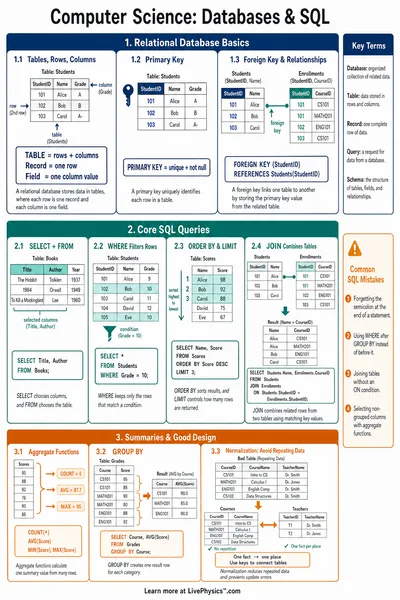
SELECT, FROM and WHERE
SELECT. Chooses which columns to return. Use a star for every column, or list columns separated by commas, with an optional AS alias.
FROM. Names the base table the query reads. You can give it a short alias, for example customers c.
WHERE. Keeps only rows that satisfy a condition. Combine comparisons with AND and OR, where AND binds tighter. Operators are =, !=, <>, <, >, <=, >= and LIKE with the percent sign as a wildcard.
JOIN, inner versus left
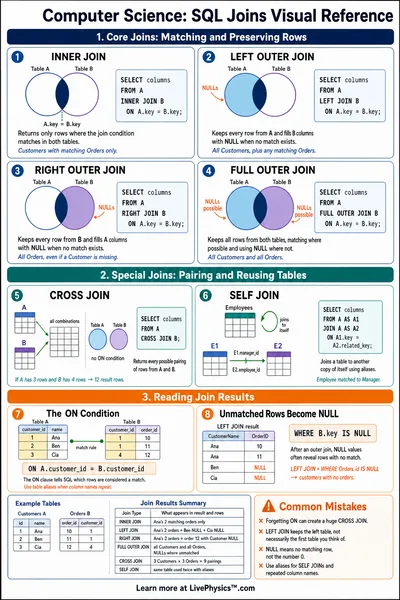
A JOIN combines rows from two tables that share a matching value, for example c.id = o.customer_id.
INNER JOIN. Keeps only the pairs that match in both tables. Rows with no match are dropped.
LEFT JOIN. Keeps every row from the left table, filling the right table columns with NULL when there is no match. JOIN with no keyword means INNER.
GROUP BY and aggregates
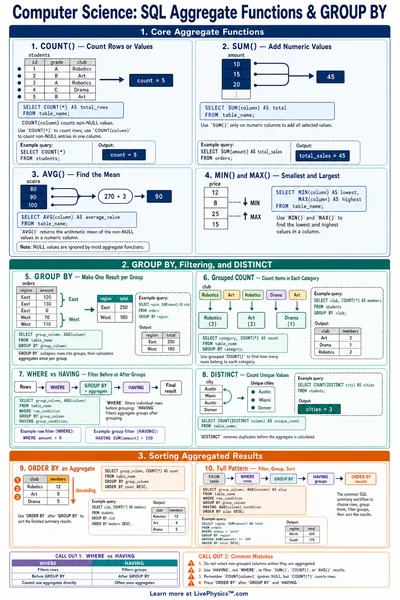
GROUP BY collapses rows that share a value into one row per group. Aggregates then summarize each group.
Supported aggregates are COUNT, SUM, AVG, MIN and MAX. COUNT(*) counts rows, while SUM(amount) or AVG(amount) work on a column.
With aggregates but no GROUP BY, the whole table collapses to a single group. HAVING then filters groups after they are formed, for example HAVING COUNT(*) > 1.
ORDER BY and LIMIT
ORDER BY. Sorts the result by one or more columns, ascending by default or descending with DESC. You can sort by an aggregate too, for example ORDER BY SUM(amount) DESC.
LIMIT. Keeps only the first n rows after sorting, which is handy for a top three list.
The logical query plan
SQL does not run clauses in the order you write them. The logical order of operations is
FROM → JOIN → WHERE → GROUP BY → HAVING → SELECT → ORDER BY → LIMIT
The plan panel rebuilds in this order as you edit the query, so you can see why a WHERE filter runs before grouping and why ORDER BY runs near the end.
What this tool is, and is not
This is a teaching subset of SQL implemented in plain JavaScript over three small sample tables. It is built to make the structure of a query and its order of operations visible.
It is not a full database. There is no INSERT, UPDATE, DELETE, subqueries, UNION, or window functions. Unsupported syntax returns a short, friendly error rather than crashing. Everything runs in your browser, so nothing is sent to a server.