Git Branching Visualizer
See what happens to the commit graph when you commit, branch, checkout, merge and rebase. Every action updates an in-memory git model, so the commit DAG, the branch pointers and HEAD all move in front of you. It is a teaching model that runs in plain JavaScript, so it makes the shape of a history visible rather than replacing real git.
Controls
Try commit, branch x, checkout x, merge x, rebase x. Add #file to mark touched files.
Repository state
| Branch | Tip | HEAD |
|---|---|---|
| main | c5 | HEAD |
| feature | c3 | · |
5 commits total, 2 branches.
Command history
- $git commit base
- $git branch feature
- $git checkout feature
- $git commit feature work
- $git commit more feature work
- $git checkout main
- $git commit main work
- $git merge feature
Commit graph
Filled circles are normal commits, hollow rings with a thick border are merge commits. Each branch has its own colored lane, with its label and the HEAD marker at the branch tip.
Reference Guide
Commits and the commit graph
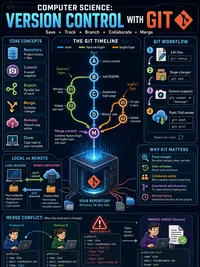
Commit. A snapshot of your work plus a link to the commit it came from. Each commit records its parent or parents, so the history forms a graph rather than a plain list.
The DAG. Commits and their parent links make a directed acyclic graph. A normal commit has one parent, the very first commit has none, and a merge commit has two.
In this tool commits are numbered c1, c2, c3 in the order they are created, and each lane is one branch.
Branches and HEAD
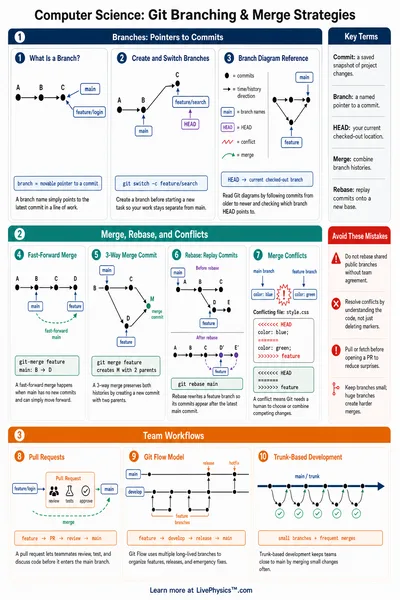
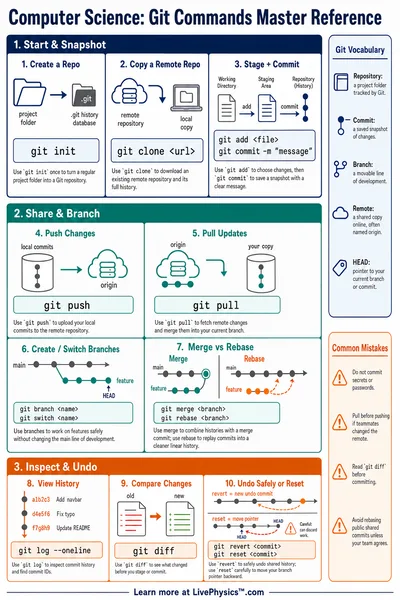
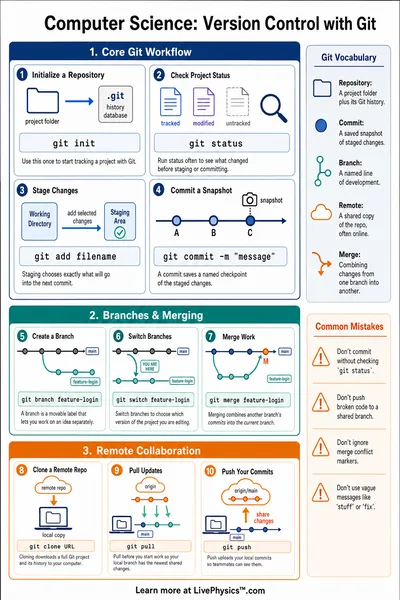
Branch. A branch is just a movable pointer to a commit. Creating a branch is cheap because it only writes one pointer, it does not copy any files.
HEAD. HEAD says which branch you are on right now. When you commit, the current branch pointer and HEAD move forward together.
Checkout moves HEAD to another branch so your next commit lands there instead.
Fast-forward versus 3-way merge
Fast-forward. If your current branch has not moved since the other branch split off, the merge just slides the pointer forward. No new commit is needed.
3-way merge. If both branches have new commits, git makes a merge commit with two parents that joins the two lines of work back together.
It is called 3-way because git compares both tips against their common ancestor, the merge base.
The merge base and conflicts
Merge base. The lowest common ancestor of the two branch tips. It is the last commit both branches share before they diverged.
Conflict. A conflict happens when both sides change the same file since the merge base. Git cannot pick automatically, so it asks you to resolve it.
This tool models that by checking whether the files touched on each side overlap. Use a #file tag on a commit to mark which file it changes.
Rebase versus merge
Rebase. Rebase replays your branch commits one by one on top of another branch tip. The result is a straight line with no merge commit.
Merge. Merge keeps both histories and joins them with a merge commit, so you can see exactly where the branches came together.
Rebase rewrites commits, so the replayed commits get new ids. The old ones are left behind, no longer pointed to by any branch.
What this tool is, and is not
This is a teaching model of git history written in plain JavaScript. It tracks commits, branch pointers, HEAD, and which files each commit touches, so it can show fast-forward, 3-way merge, conflicts and rebase.
It is not real git. There is no working tree, staging area, remote, stash or tag, and conflict detection is based on file names only. Everything runs in your browser and your command sequence is saved in the link so you can share a graph.