Tally Marks & Pictograph Lab
Pick a scenario, set counts for each category, and see the same data as tally marks and pictographs. Record your observations and decide which display makes comparing easier.
Guided ExperimentTally vs Pictograph Investigation
You will show the same data in two ways. Which one do you think will make it easier to compare categories, tally marks or pictographs? Write your prediction and explain why.
Write your hypothesis in the Lab Report panel, then click Next.
Choose a Scenario
Which pet got the most votes?
Set Counts for Each Category
Tally Marks
Tally marks group counts in sets of 5. A diagonal slash crosses each group of 5.
Pictograph
Each picture stands for one vote. Longer rows mean more votes.
Controls
Reference Guide
What Are Tally Marks
Tally marks are single lines that stand for one count each. Every fifth mark is a diagonal slash across the first four, so you can count by fives.
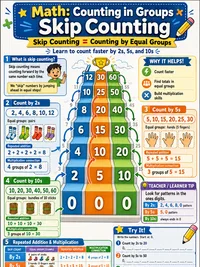
Tally marks help you keep track while counting. You can find the exact total by skip-counting the groups of 5 and adding any leftovers.
What Is a Pictograph
A pictograph uses a picture or icon to stand for one count. All of one category line up in a row, so the longest row has the most.
Pictographs make comparing fast. You can spot the biggest and smallest categories just by looking at the row lengths.
Finding Most and Least
The Most category has the largest count. The Least category has the smallest count. These answers do not change when you switch displays.
When you record data, the Most and Least flags help confirm your reading is correct across both displays.
Choosing a Display
Tally marks work well while you collect data and need exact counts. The groups of 5 make totals easy to find.
Pictographs are better for comparing categories quickly because the picture rows line up side by side and show who has the most at a glance.