Tally Marks & Pictograph Builder
Record survey data using tally marks, then see the same data displayed as a pictograph. Answer questions about the data to practice reading charts.
CategoryTally MarksPictograph
🐶Dogs5
🐱Cats3
🐟Fish2
🐦Birds4
Total votes 14Most 🐶 Dogs (5)
How to read this chart
- Each tally mark (|) stands for one vote.
- After four marks, the fifth mark goes diagonally to make a group of 5.
- In the pictograph, each picture also stands for one vote.
- The row with the most marks or pictures got the most votes.
Switch to Practice or Challenge mode to answer questions about the data.
Reference Guide
Tally Marks
- Each tally mark stands for one vote or item.
- After four marks, the fifth goes diagonally across to make a group of 5.
- Groups of 5 are easy to count quickly.
- Example, 7 = a group of 5 and 2 more.
Pictographs
- A pictograph uses pictures or symbols to show data.
- Each symbol stands for one item (or more, with a key).
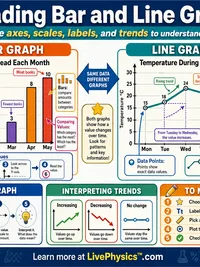
- Longer rows mean bigger numbers at a glance.
- Great for comparing categories visually.
Reading a Chart
- Find the row with the most marks to see what got the most votes.
- Find the row with the fewest marks to see what got the least.
- Subtract two rows to find how many more one has than another.
- Add all rows to find the total number of votes.
Standards Covered
- 1.MD.4 - Organize, represent, and interpret data with up to three categories.
- 2.MD.10 - Draw a picture graph and a bar graph to represent a data set.
- Practice asking and answering questions about the total, comparisons, and differences.
Related Content
Visual Explainers
Related Tools
MAP Growth Grade 3 Math Practice
Original independent MAP Growth Grade 3 Math skill practice with explanations, adjustable difficulty and first-attempt progress; no official RIT score.
MAP Growth Grade 4 Math Practice
Original independent MAP Growth Grade 4 Math skill practice with explanations, adjustable difficulty and first-attempt progress; no official RIT score.
MAP Growth Grade 5 Math Practice
Original independent MAP Growth Grade 5 Math skill practice with explanations, adjustable difficulty and first-attempt progress; no official RIT score.
MAP Growth Grade 6 Math Practice
Original independent MAP Growth Grade 6 Math skill practice with explanations, adjustable difficulty and first-attempt progress; no official RIT score.
Related Labs
Tally Marks & Pictograph Lab
Record survey data as both tally marks and pictographs. Compare which display makes it easier to answer questions like which is most or how many more. Grades 1-2.
Picture Graph & Bar Graph Detective Lab
Become a data detective! Build picture graphs and bar graphs from real class data, answer questions, and discover what the numbers show.
Measurement Detectives Lab
Measure virtual objects in inches and centimeters using an interactive ruler, convert between units, and display results on a line plot to find the mode and range
Thermometer & Temperature Lab
Investigate temperature readings for different weather conditions. Record temperatures in Celsius and Fahrenheit and explore what each reading feels like. Grades K-3.