Understanding Data Graph Creator for Kids
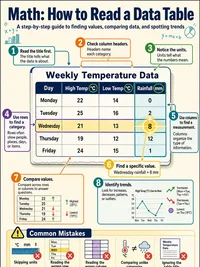
Before making a graph, decide what each number measures. A list of favourite fruits, daily temperatures, or books read needs one clear unit, such as votes, degrees, or books. Mixing units makes comparisons meaningless.
Labels matter because they tell the reader what every value belongs to. Use short names that do not overlap, and make sure each label matches its number in the same position. Clear labels prevent simple mistakes.
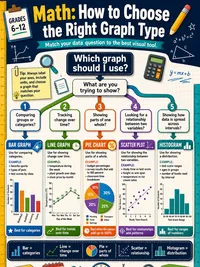
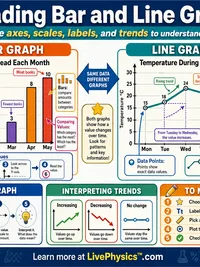
Bar graphs are useful for comparing separate categories. The height of each bar shows the amount, so equal bar widths and a consistent scale keep the comparison fair. Leave spaces between bars to show that categories are separate.
Line graphs work best when values change in an order, especially over time. A rising line can show growth, while a falling line can show a decrease. The line does not explain the cause of a change.
Pie charts show how a whole is shared between parts. The data should add up to one complete total, and very small slices can be hard to see or compare accurately. They are less useful when there are many categories.
Pictographs use repeated pictures to represent amounts. Always read the key first, because one picture may stand for two, five, or another number of items. A half picture may represent part of that amount.
The scale on an axis can change how dramatic a difference looks. Starting a bar graph above zero may make close values appear far apart. Check the numbered intervals before drawing conclusions from the bar heights.
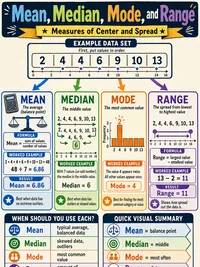
The mean uses every value in a data set. Add all values, then share the total equally across the number of values. One unusually large or small result can pull the mean away from most of the data.
The median is the middle value after the data is put in order. Mode shows the most common value, while range tells how spread out the data is. Range compares the largest and smallest values.
Check the original data before trusting a graph or statistic. A misplaced digit, a missing response, or two labels for the same category can change the picture. These errors can lead to a wrong conclusion.
Students meet graphs in weather reports, sports tables, school surveys, news stories, and shopping information. Practice noticing what was counted and who collected the information. Think about whether the graph leaves out important details.
A good graph makes patterns easier to notice, but it cannot prove that one event caused another. Describe only what the data supports. Words such as more, less, steady, or clustered can help explain a pattern clearly.