Linear Regression Calculator
Enter paired data to find the best-fit line, correlation, and residuals. Drag the prediction point along the line to explore. All calculations run in your browser.
Tip, Press Ctrl+Enter (Cmd+Enter on Mac) to calculate.
Reference Guide
The Least Squares Method
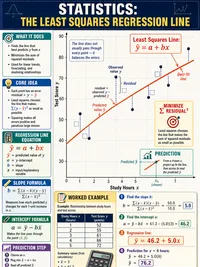
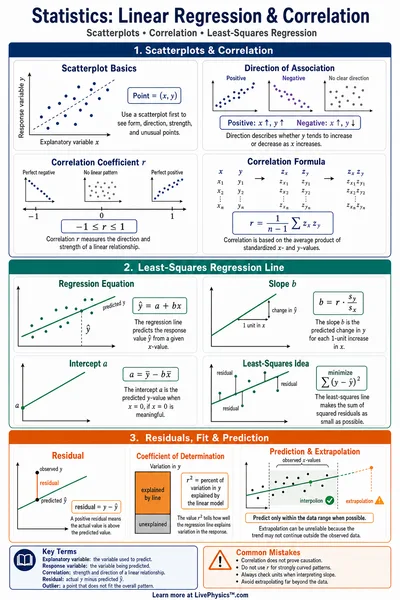
The best-fit line minimizes the sum of squared differences between observed and predicted values.
Slope
Intercept
Correlation Coefficient (r) and R²
Pearson's r Measures the strength and direction of a linear relationship, from −1 to +1.
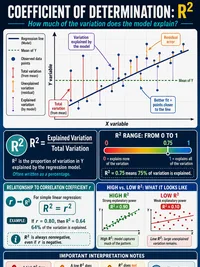
R² (Coefficient of Determination) The proportion of variance in y explained by x. Calculated as .
Values above 0.7 suggest a strong relationship. Between 0.3 and 0.7 is moderate. Below 0.3 is weak.
Interpreting Slope and Intercept
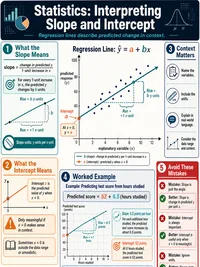
Slope (m) For each one-unit increase in x, y is predicted to change by m units. A negative slope means y decreases as x increases.
Intercept (b) The predicted value of y when x is zero. Be careful interpreting this if x = 0 is outside your data range, since the model may not hold there.
Extrapolation warning Predictions beyond the range of your data (extrapolation) are less reliable than predictions within the range (interpolation).
Residuals and Model Assumptions
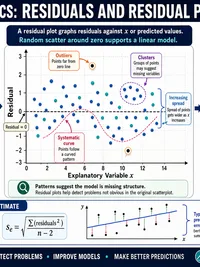
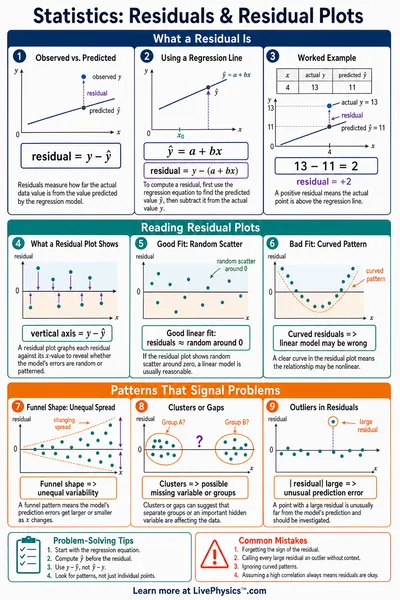
Residual The difference between the observed and predicted value.
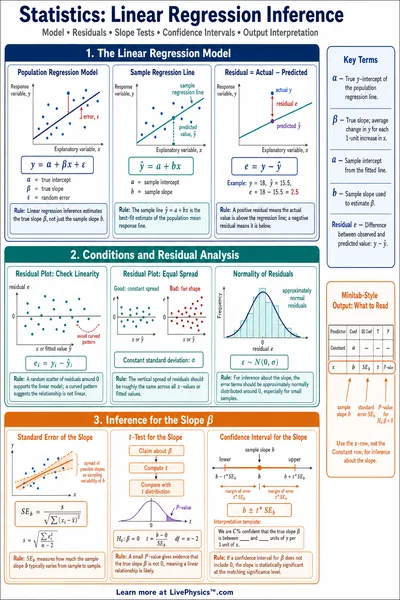
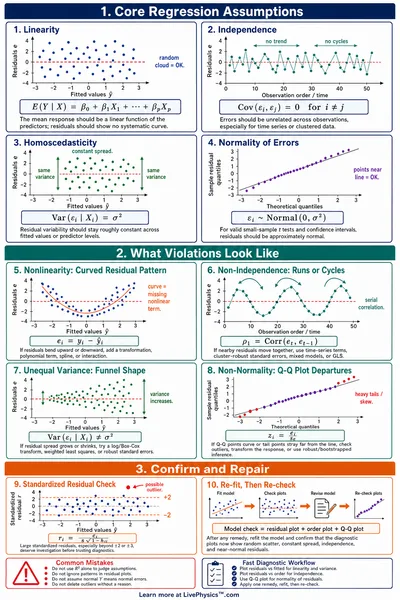
Residual plot Plot residuals against predicted values. If the linear model fits well, residuals should scatter randomly around zero with no visible pattern.
Warning signs A curved pattern suggests a nonlinear relationship. A funnel shape suggests unequal variance (heteroscedasticity). Both indicate the linear model may not be appropriate.
Related Content
Visual Explainers
Related Tools
Mean, Median & Mode Explorer
Enter a dataset to see mean, median, and mode on an interactive number line with a balance-point fulcrum, box plot, and step-by-step calculations.
Descriptive Statistics Calculator
Compute mean, median, mode, standard deviation, and more. Visualize data with interactive box plots and histograms.
Probability Distributions Explorer
Explore normal, binomial, Poisson, and uniform distributions. Visualize PDF/CDF plots, compute probabilities with draggable bounds, and find inverse values.
Hypothesis Testing Calculator
Run z-tests, t-tests, two-sample t-tests, and chi-square goodness-of-fit tests. See test statistics, p-values, critical values, and step-by-step breakdowns.
Related Labs
Regression & Residual Diagnostics Lab
Fit linear, quadratic, and exponential models then diagnose fit with residual plots, leverage, Cook's distance, and Q-Q plots. Explore Anscombe's Quartet to see why R² alone is not enough
Scientific Data Graphing Lab
General purpose data analysis lab. Paste a CSV, upload a file, or load a sample. Choose X and Y columns and fit a linear, quadratic, cubic, power, exponential, or logarithmic curve. Auto best fit picker, R squared, residuals, and shareable URL.
Logistic Regression Classifier Lab
Place two classes of 2D points, then train a logistic regression classifier with gradient descent and watch the decision boundary and cross-entropy loss curve evolve. Adjust the learning rate, compare separable and overlapping data, and see why a single straight boundary cannot solve an XOR pattern.
Mission Packs
Data & Statistics Mission
Collect, display, and analyze data - from picture graphs and bar charts to distributions, regression, and hypothesis testing.
AP Statistics Mission
Cover the full AP Statistics curriculum - distributions, sampling, confidence intervals, hypothesis testing, regression, and inference.