Wave Interference & Diffraction Explorer
Explore wave interference and diffraction with an interactive 2D visualization. Drag coherent sources to see standing patterns, or simulate Young's double-slit and single-slit diffraction with adjustable wavelength, slit separation, and screen distance.
About wave interference
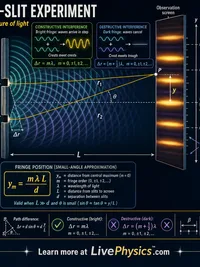
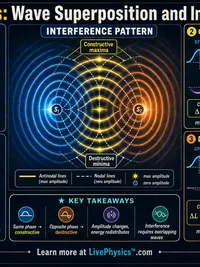
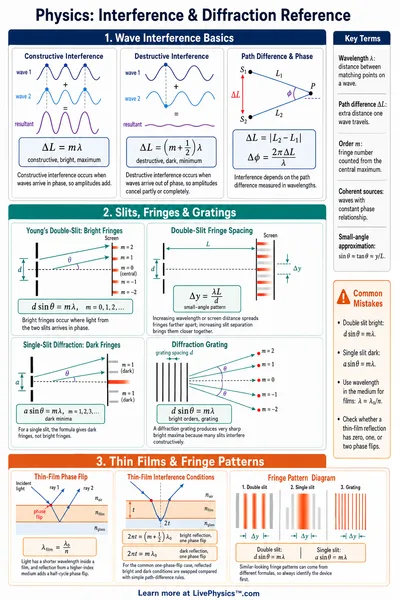
When two coherent waves meet, they add point by point. Where peaks line up with peaks, the result is bright. Where peaks meet troughs, the waves cancel and the result is dark. This is the basis of optical interference patterns, holography, and the famous double-slit experiment.
Curriculum alignment
Supports AP Physics 2 unit 8 (Electromagnetic Waves and Optics), Honors Physics waves unit, and middle-school sound and light units (NGSS MS-PS4-1, MS-PS4-2, HS-PS4-3). The double-slit and single-slit modes are the textbook setups for fringe-spacing calculations.
How to use
- Two Sources mode. Drag the numbered circles on the canvas to reposition the coherent sources. Adjust wavelength to see the interference pattern shift in real time.
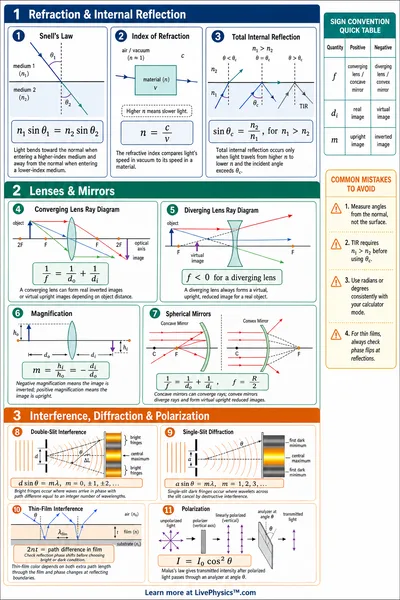
- Double Slit mode. Change slit separation d and screen distance L to shift fringe positions. The yellow vertical line marks the screen; labelled crosshairs mark bright fringe centres.
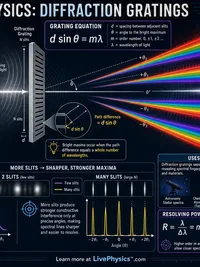
- Single Slit mode. Reduce slit width a to widen the central maximum. The red dashed lines mark the first diffraction minimum.
Key concepts
- Constructive interference occurs when path-length difference equals a whole number of wavelengths.
- Destructive interference occurs at half-integer multiples of wavelength.
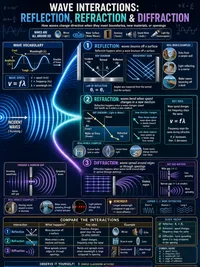
- Diffraction causes a single aperture to spread waves and produce a characteristic central lobe with weaker side lobes.
- The colormap uses blue for negative amplitude (trough), white for zero, and red for positive amplitude (peak).