Scatter Plot and Correlation Explorer
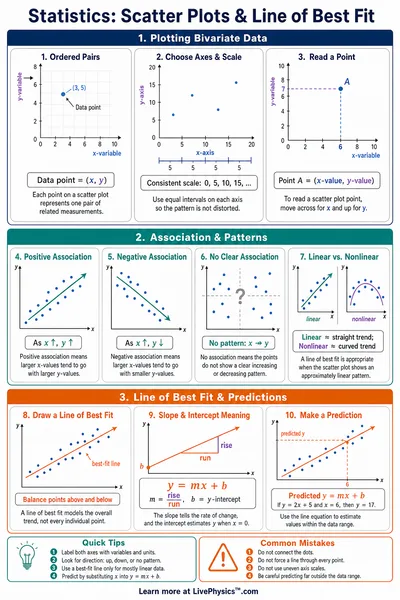
Enter x, y data pairs to visualize bivariate data, compute Pearson correlation coefficient (r and r²), and fit a linear regression line. Choose from presets or enter your own data.
Scatter Plot
Data Input
Format x, y per line. Example 3.5, 72.1
13 points loaded
Results
Pearson r
0.9925
r²
0.9850
Slope
8.1538
Intercept
40.8462
Regression Line
y = 8.1538x +40.8462
Interpretation
Very strong positive correlation (n = 13)
r² = 98.5% of the variance in y is explained by x.
Correlation Strength
Reference Guide
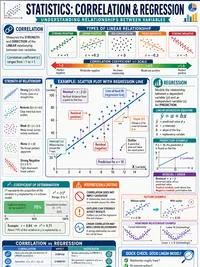
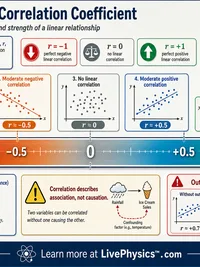
Pearson Correlation Coefficient
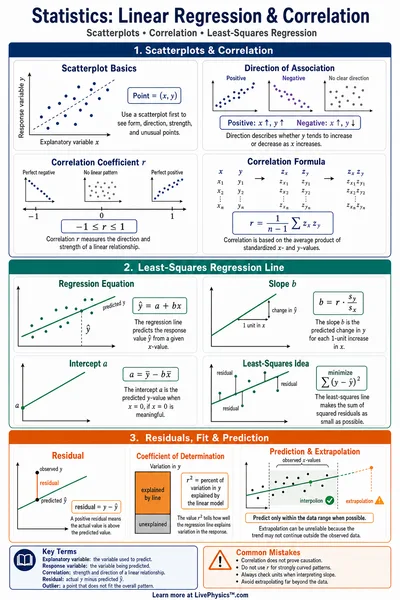
The Pearson r measures the linear relationship between two variables. It ranges from -1 (perfect negative) to +1 (perfect positive), with 0 meaning no linear relationship.
- |r| >= 0.9, Very strong
- |r| >= 0.7, Strong
- |r| >= 0.5, Moderate
- |r| >= 0.3, Weak
- |r| below 0.3, Very weak
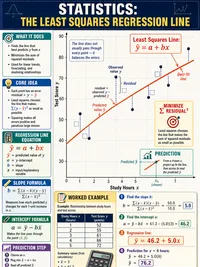
Linear Regression
The regression line minimizes the sum of squared residuals (ordinary least squares). It gives the best linear predictor of y given x.
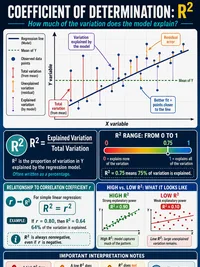
Interpreting r²
The coefficient of determination r² tells you the proportion of variance in y that is explained by x. For example, r² = 0.81 means 81% of the variation in y is accounted for by the linear relationship with x.
r² ranges from 0 (no explanatory power) to 1 (perfect fit). Correlation does not imply causation.