Area Model Multiplication Studio
See why multiplication works by drawing rectangles. Break numbers into tens and ones, find the area of each section, then add the pieces together for the full product.
Try an example
23 × 14 = ?
We want to multiply 23 × 14.
Press Next to break these numbers into tens and ones.
1
2
3
4
Step 1: See the problem
Area Model Reference
How the Area Model Works
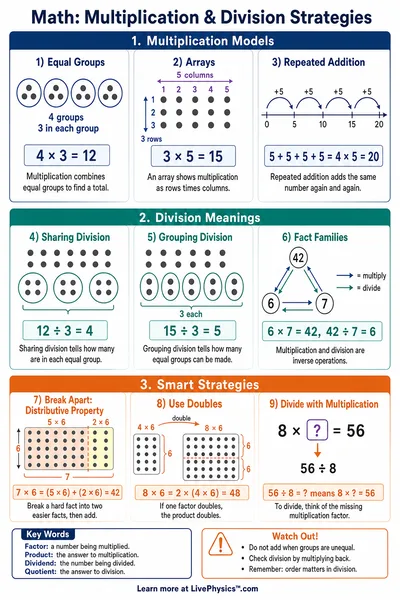
The area model shows multiplication as a rectangle split into parts.
- 23 × 14 = (20 + 3) × (10 + 4)
- 20 × 10 = 200 (top-left)
- 20 × 4 = 80 (top-right)
- 3 × 10 = 30 (bottom-left)
- 3 × 4 = 12 (bottom-right)
- 200 + 80 + 30 + 12 = 322
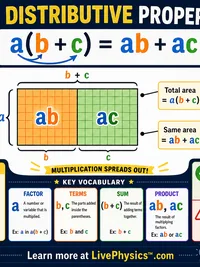
Distributive Property
The area model uses the distributive property:
a × (b + c) = a × b + a × c
You break one factor into smaller pieces, multiply each piece, then add the results.
This is the same strategy used in the standard algorithm - the area model just makes it visible.
Related Content
Visual Explainers
Related Tools
MAP Growth Grade 3 Math Practice
Original independent MAP Growth Grade 3 Math skill practice with explanations, adjustable difficulty and first-attempt progress; no official RIT score.
MAP Growth Grade 4 Math Practice
Original independent MAP Growth Grade 4 Math skill practice with explanations, adjustable difficulty and first-attempt progress; no official RIT score.
MAP Growth Grade 5 Math Practice
Original independent MAP Growth Grade 5 Math skill practice with explanations, adjustable difficulty and first-attempt progress; no official RIT score.
MAP Growth Grade 6 Math Practice
Original independent MAP Growth Grade 6 Math skill practice with explanations, adjustable difficulty and first-attempt progress; no official RIT score.
Related Labs
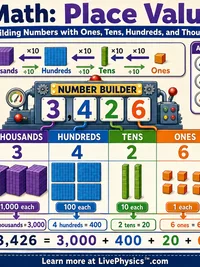
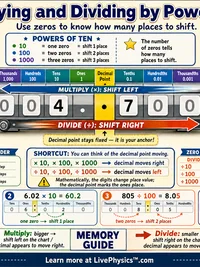
Place Value, Decimals & Scientific Notation Lab
Decompose numbers into place values with a color-coded chart. Convert between decimals, fractions, and percents. Express very large and small numbers in scientific notation
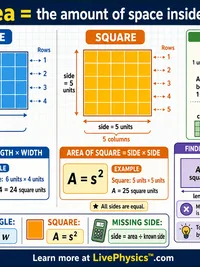
Area & Perimeter Design Challenge
Build fenced gardens on a grid and discover the relationship between perimeter and area. Fixed-perimeter mode, draw any shape with a given fence length and find the configuration that maximizes enclosed area. Fixed-area mode, minimize fencing for a given area. Isoperimetric inequality visualization with SVG grid, shape trace, and optimization leaderboard.
Garden Area & Perimeter Lab
Design garden plots on a square grid, calculate area and perimeter, and discover how different shapes can have the same area but different perimeters
Bar Model Word Problems Lab
Use bar models to represent and solve word problems. Explore part-part-whole and comparison models and discover when each model helps most. Grades 2-5.