Percentile Calculator
Enter any dataset of numbers to instantly compute the five-number summary, quartiles, IQR, and outlier fences. Look up the percentile rank of any value or find the value at any percentile. A dot plot highlights the IQR band and flags outliers.
Enter Your Data
Tip, Press Ctrl+Enter to calculate. Separate values with commas or new lines.
Five-Number Summary
Dot Plot with Quartile Bands
Percentile Lookup
Reference Guide
Percentiles and Quartiles
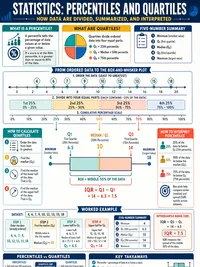
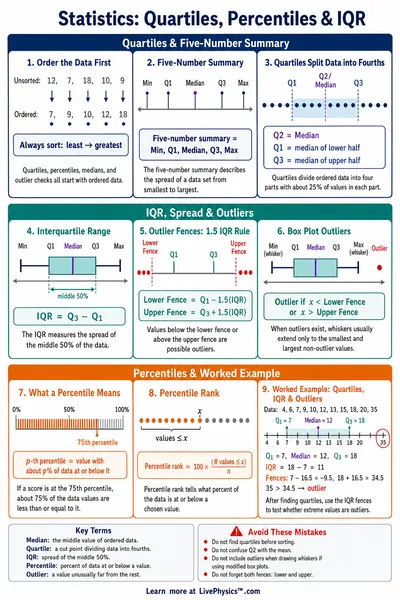
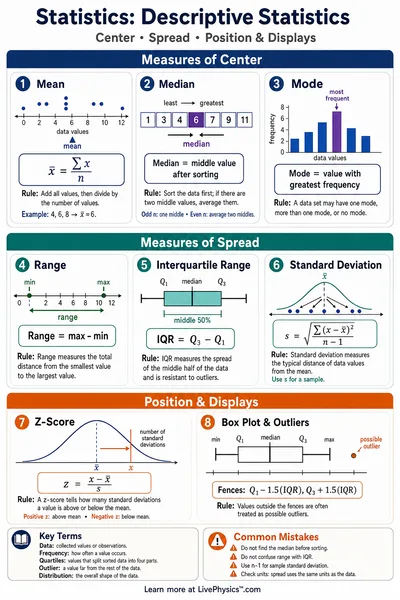
A percentile tells you what percentage of values in a dataset fall below a given value. If a score is at the 75th percentile, 75% of the values are lower than it.
Quartiles divide a sorted dataset into four equal parts. The three quartile boundaries are Q1 (25th percentile), Q2 (median, 50th percentile), and Q3 (75th percentile).
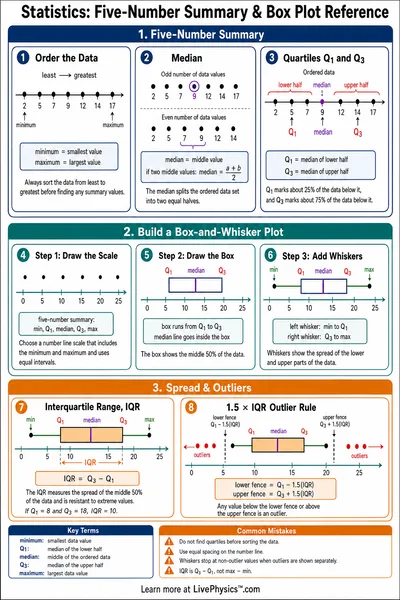
This tool uses the exclusive-median (Tukey) method, for an odd number of values, the median itself is excluded from both halves when computing Q1 and Q3.
IQR and Outliers
The interquartile range (IQR) measures the spread of the middle 50% of the data. It is resistant to extreme values, making it a better measure of spread than the full range when outliers are present.
Outliers are identified using Tukey fences. Any value outside these bounds is flagged as a potential outlier (shown in red on the dot plot).
Five-Number Summary
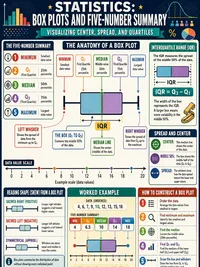
The five-number summary is a compact description of a dataset's distribution. It consists of five statistics that together capture both the center and spread.
The five-number summary is the basis for a box-and-whisker plot. The box spans Q1 to Q3, the line inside is the median, and the whiskers extend to the fences.
Computing Percentile Ranks
This tool uses the nearest-rank method. The percentile rank of a value x is the percentage of data values strictly less than x.
To find the value at percentile P (nearest-rank lookup)
The index is clamped to [0, n-1] so edge cases like P = 0 or P = 100 always return valid data values.