Variables & Scorekeeper Studio
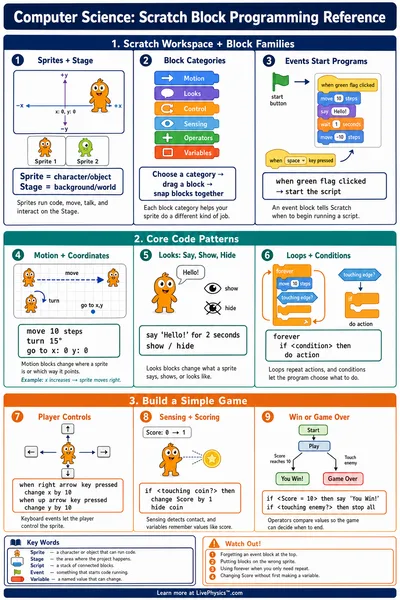
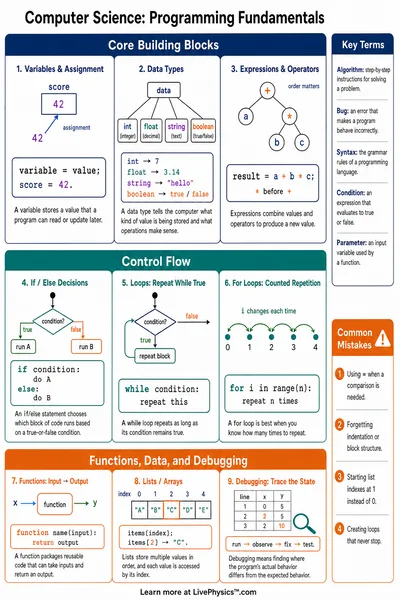
A variable is a named container that stores a value you can change. Create score jars, build a program with Add and Subtract blocks, and run it to see each step in action.
A program is ready for you. Press Run Step to run one block at a time and watch the jar values change. See how each instruction updates the scorekeeper.
Score Jars (Variables)
🫙Player 1starts at 0
0
🫙Player 2starts at 0
0
Program
- 1Add 10 to Player 1
- 2Add 5 to Player 2
- 3Add 10 to Player 1
- 4Subtract 3 from Player 2
- 5Add 10 to Player 1
What is a variable?
A variable is a named container that holds a value. You can change what is inside it any time. In this tool, each score jar is a variable. When you run Add, Subtract, Set, or Reset blocks, you are writing instructions that change what is stored in each jar.
Related Content
Visual Explainers
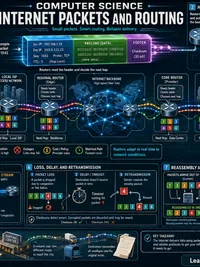
How Does the Internet Send Your Message?
Tiny pieces take many paths
Why Does My Phone Get Hot When I Play Games?
Fast graphics turn battery energy into heat
How Does a Computer Add Two Numbers?
From bits to a working adder
How Does Wi-Fi Carry Photos Through the Air?
Radio waves move bits in planned chunks
Related Tools
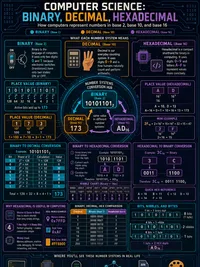
Binary, Decimal & Hex Converter
Convert between binary, decimal, hexadecimal, and octal. Bit-level visualization, ASCII lookup, and step-by-step conversion methods.
Truth Table Generator
Enter Boolean expressions with AND, OR, NOT, XOR, and IMPLIES to generate complete truth tables. Detects tautologies and contradictions.
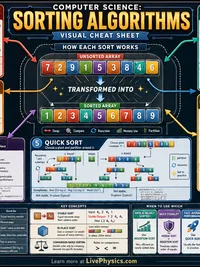
Sorting Algorithm Visualizer
Watch bubble, selection, insertion, merge, and quick sort in action with color-coded bars for comparisons, swaps, and sorted elements.
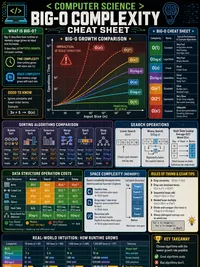
Big-O Complexity Visualizer
Compare O(1), O(log n), O(n), O(n log n), O(n^2), O(n^3), and O(2^n) on an interactive graph. See operation counts at any input size.
Related Labs
Variables & Scorekeeper Lab
Learn what a variable is, run step-by-step score programs, and design your own game. Watch values change as you add, subtract, and reset. Grades 3–5.
Coding Mazes & Sequencing Lab
Write step-by-step programs to navigate a robot through mazes, trace execution, and debug broken sequences
If/Then Choice Lab
Build IF/THEN/ELSE decision rules and test them with real-world scenarios. Discover how computers use conditional logic to make decisions. Grades 3-5.
Loops, Debugging & Animation Lab
Compare flat programs to loop-based ones, fix buggy programs, and create event-driven sprite animations