Topographic Map and Contour Lines Tool
Visualize terrain in 3D and read contour maps in 2D. Choose a terrain preset, adjust the contour interval, and click anywhere to measure elevation.
3D Terrain View(drag to rotate, scroll to zoom, click to read elevation)
2D Contour Map
Elevation Readout
Click the 3D terrain to read elevation
Elevation Legend
Reading Topographic Maps
Contour Lines
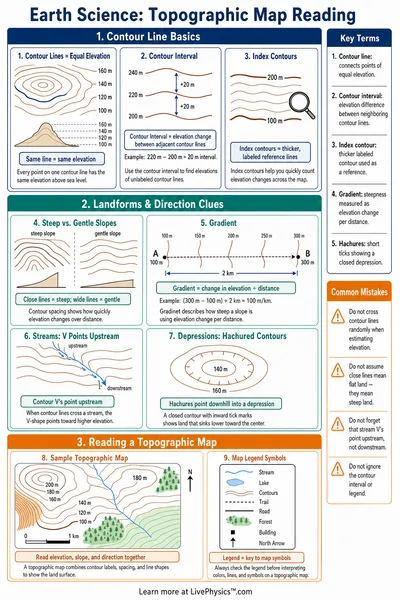
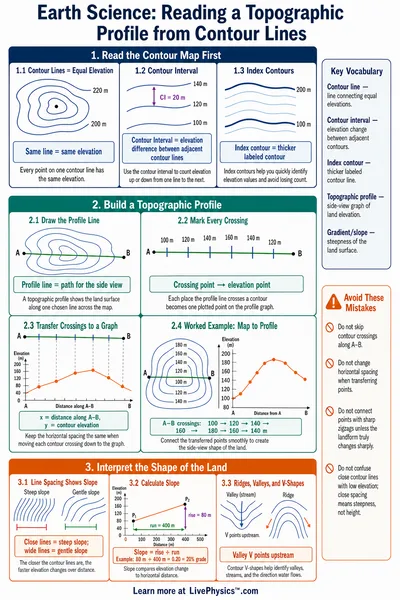
Each contour line connects points of equal elevation. Lines close together mean steep terrain. Lines spaced far apart mean gentle slopes or flat ground.
Index Contours
Every fifth contour line is drawn heavier and labeled with its elevation value. These index contours make it easier to read the map and estimate heights quickly.
Topographic Profiles
A topographic profile is a cross-section of the terrain along a line. It shows the rise and fall of elevation and helps visualize hills, valleys, and ridges in side view.
Terrain Types
Mountain
High central peak with ridges radiating outward. Contour lines form tight concentric rings near the summit.
Valley
Low-lying region surrounded by higher ground. Contour lines form V-shapes pointing uphill where streams flow.
Plateau
A large flat or gently rolling elevated area. Contour lines appear widely spaced on top and bunched at edges.
Coastal
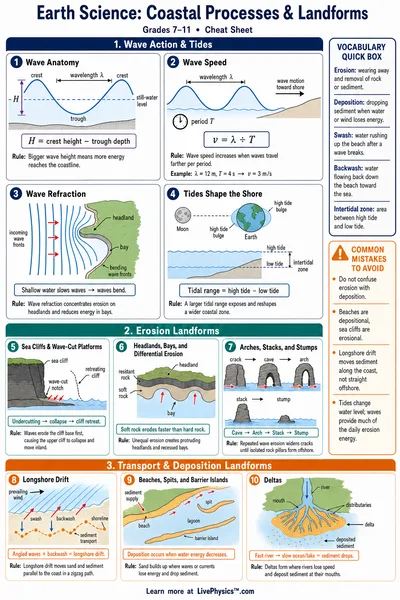
Terrain rising from sea level. Low-elevation areas near the coast transition to higher ground inland.
Volcano
Steep cone shape with a depressed crater at the summit. Circular contour lines with a hollow at the top indicate a caldera.
Contour Interval
The vertical distance between adjacent contour lines. A small interval shows more detail; a large interval gives a broader overview.